Skip to content
Trio Travel guide

Booking Accommodation Service

On this page
  1. 1 Prepare the Booking file
  2. 2 Set the hotel and rooms
  3. 3 Enter rates and save
  4. 4 Edit before locking
  5. 5 Review deletion confirmation
  6. 6 Lock the file
  7. 7 Review the cost journal
  8. 8 Review the revenue journal
  9. 9 Review profitability
  10. 10 Convert the service into an invoice

Add and edit accommodation, then review file locking, accounting journals and the converted invoice.

1 Prepare the Booking file
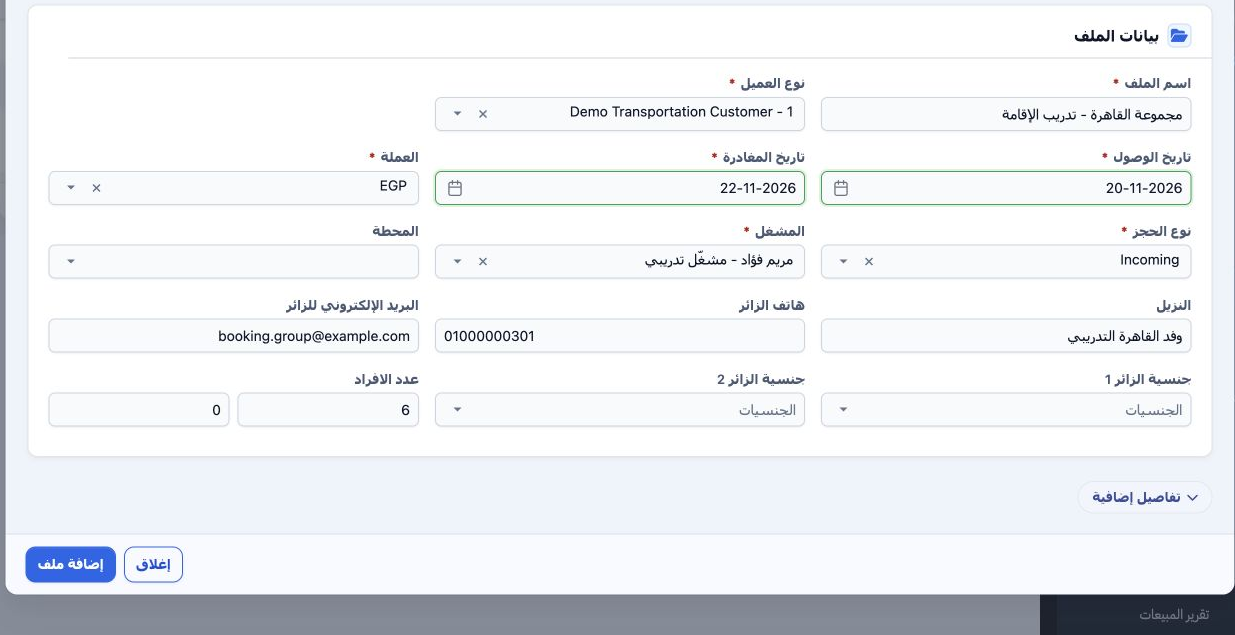
1 Open General Tourism → Files and open the customer file, or add a new one. Select the customer, arrival and departure dates, currency, file...
Open General Tourism → Files and open the customer file, or add a new one. Select the customer, arrival and departure dates, currency, file type, operator and guest count, then save. This Incoming example uses EGP for six adults from 20 to 22 November 2026. The saved file is 202611000003, internal code 47080617. Open Add Accommodation (إضافة إقامة) within the file.

2 Set the hotel and rooms

2 In the accommodation form, choose the hotel, supplier, cost currency and exchange rate. Maintain hotels, room types and meal plans in Settin...
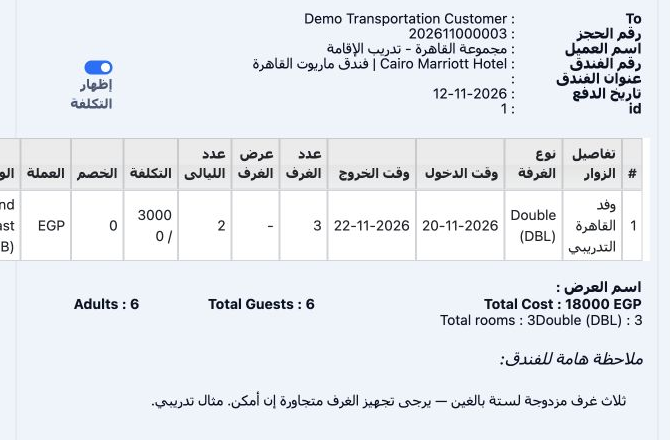
In the accommodation form, choose the hotel, supplier, cost currency and exchange rate. Maintain hotels, room types and meal plans in Settings, and suppliers in Suppliers. This example uses Cairo Marriott Hotel, Demo Transport Supplier and EGP at rate 1. Choose Double (DBL), three rooms, two nights and Bed and Breakfast (BB). The screenshot shows the saved data through Actions → Print Rooms.

3 Enter rates and save

3 Enter a nightly room cost of 3,000 EGP and selling rate of 4,000 EGP. The example calculates cost as 3,000 × 3 × 2 = 18,000 and selling tota...
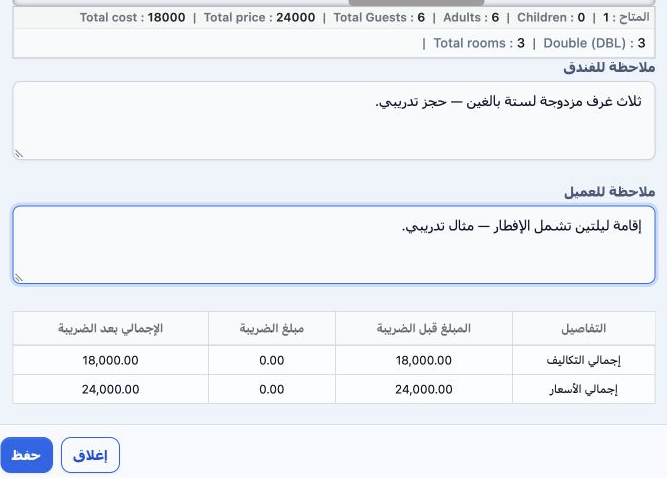
Enter a nightly room cost of 3,000 EGP and selling rate of 4,000 EGP. The example calculates cost as 3,000 × 3 × 2 = 18,000 and selling total as 4,000 × 3 × 2 = 24,000. Review guest and room totals and tax, add hotel and customer notes, then Save. These are training prices. Accommodation reference 47080640 was saved with both taxes set to None (بدون).

4 Edit before locking

4 Open the accommodation row’s Actions menu and choose Edit. Change the booking or room details, then Save. In this test, the room-row guest n...
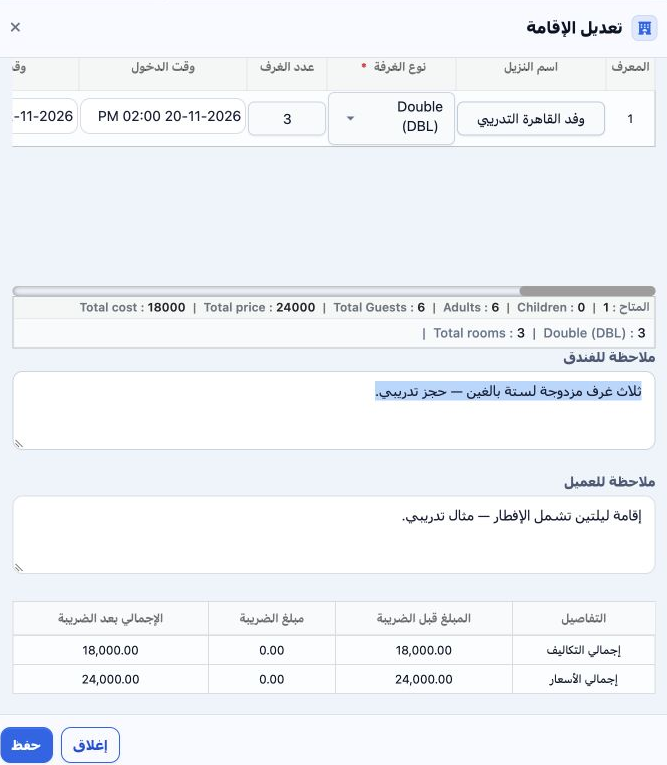
Open the accommodation row’s Actions menu and choose Edit. Change the booking or room details, then Save. In this test, the room-row guest name was changed to وفد القاهرة التدريبي and the hotel note requested adjacent rooms. The new guest name appeared in the list after saving; cost remained 18,000 and sale 24,000. Edit, Copy and Delete become disabled after the file is locked.

5 Review deletion confirmation

5 Before locking, choose Actions → Delete for the intended service. The system warns that deletion cannot be undone. Choose No (لا) to return...
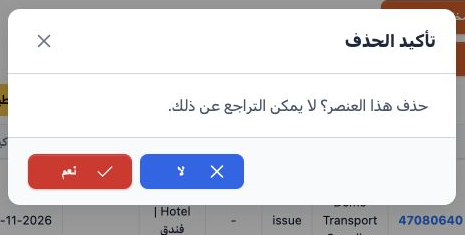
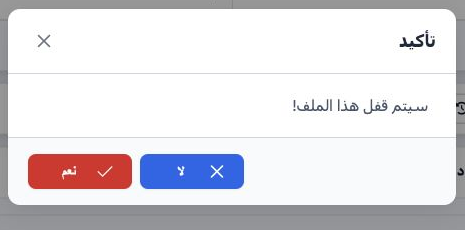
Before locking, choose Actions → Delete for the intended service. The system warns that deletion cannot be undone. Choose No (لا) to return without deleting, or Yes (نعم) to confirm after checking the service. No was selected in this example, preserving the accommodation for the remaining workflow.

6 Lock the file

6 Review the accommodation and file total, then select Lock (غلق). Review the confirmation and choose Yes. The accommodation changed from Unco...
Review the accommodation and file total, then select Lock (غلق). Review the confirmation and choose Yes. The accommodation changed from Unconfirmed to Confirmed, and Unlock replaced Lock. Service-addition controls became disabled. Cost and revenue journals appeared in Accounting under file reference 47080617.

7 Review the cost journal

7 Open Accounting → Journal Entries and search Relative# for 47080617. Right-click journal J-34 and choose View. Debit is 18,000 EGP to accoun...
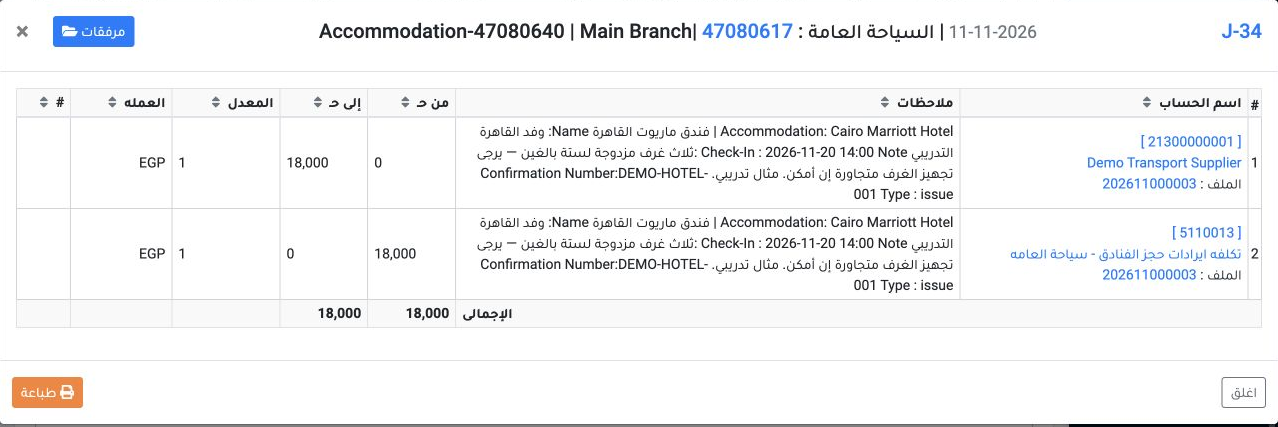
Open Accounting → Journal Entries and search Relative# for 47080617. Right-click journal J-34 and choose View. Debit is 18,000 EGP to account 5110013, general-tourism hotel cost. Credit is 18,000 EGP to supplier account 21300000001, Demo Transport Supplier. This journal is dated 11 November 2026 and its source is Accommodation.

8 Review the revenue journal

8 View J-35 from the same reference results. Debit is 24,000 EGP to customer account 12200000001. Credit is 24,000 EGP to account 4120007, gen...
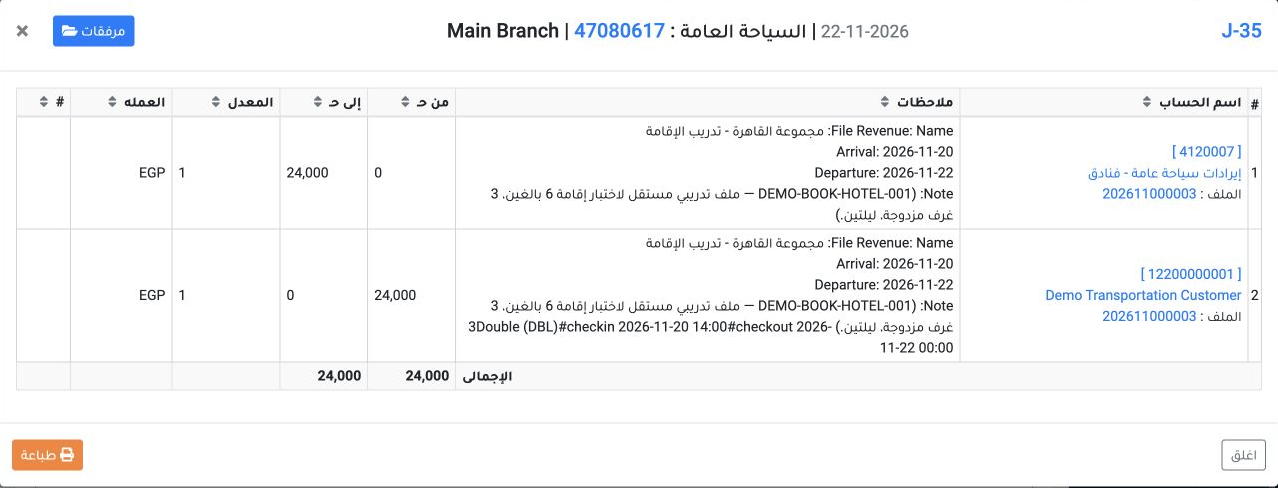
View J-35 from the same reference results. Debit is 24,000 EGP to customer account 12200000001. Credit is 24,000 EGP to account 4120007, general-tourism hotel revenue. It is dated 22 November 2026 and its source is Booking Revenue. The narrative identifies the file, dates and rooms. Revenue recognition does not mean cash receipt; no payment was recorded for this file.

9 Review profitability

9 Return to the file and open Profit and Loss (مكسب وخساره). Accommodation shows cost 18,000, sale 24,000 and profit 6,000 EGP. The displayed...
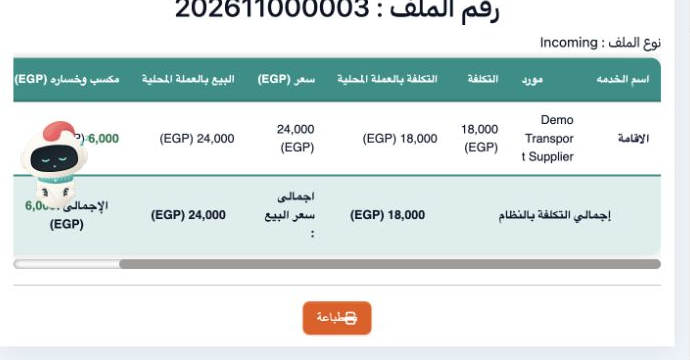
Return to the file and open Profit and Loss (مكسب وخساره). Accommodation shows cost 18,000, sale 24,000 and profit 6,000 EGP. The displayed 33.33% equals profit divided by cost in this example. Customer payment remaining stays 24,000 until payment is recorded.

10 Convert the service into an invoice
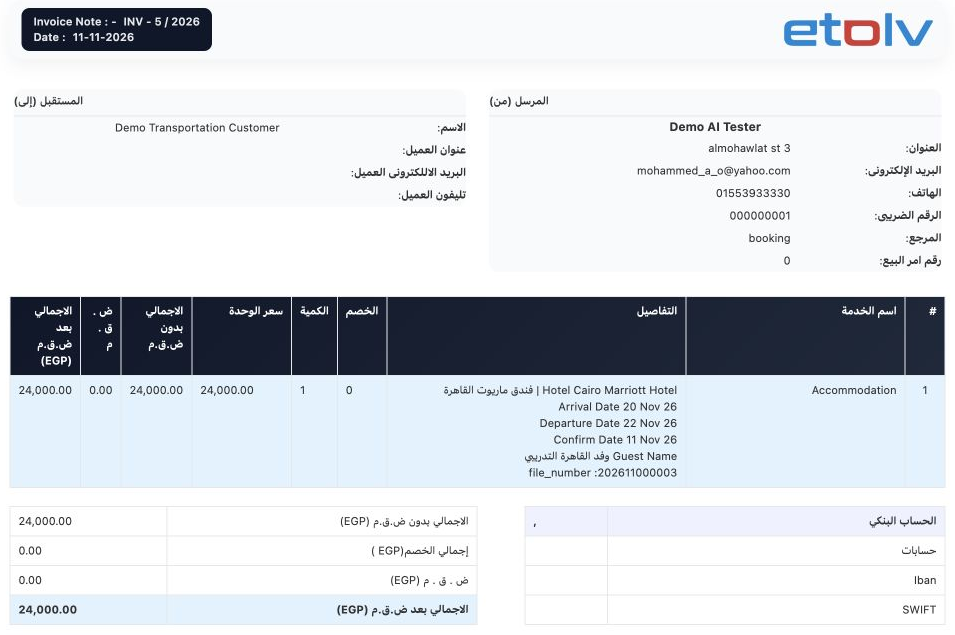
10 Select Convert to Invoice in the file and confirm. This created invoice i-5/2026, internal code 47080830, with invoice number 5 linked on th...
Select Convert to Invoice in the file and confirm. This created invoice i-5/2026, internal code 47080830, with invoice number 5 linked on the accommodation row. In Sales Invoices, view it and review the customer, currency, hotel, dates, guest and file number. Accommodation transfers as one invoice item with quantity 1 and value 24,000 EGP. At this stage the invoice is Unconfirmed and Unpaid, with 24,000 remaining.

Sign in to record the lessons you have read. Sign in