Skip to content
Trio Travel guide

Supplier Statement

Use this report to review each supplier’s net balance and open the ledger transactions from the supplier name.
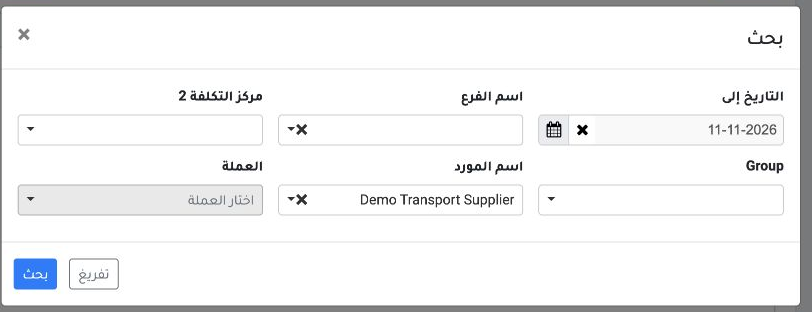
1 Open Accounting → General Reports → Supplier Statement and select Local Currency. Choose Search and select Demo Transport Supplier. Set the...
Open Accounting → General Reports → Supplier Statement and select Local Currency. Choose Search and select Demo Transport Supplier. Set the To Date to 11 November 2026. Leave the currency field in Search blank for this view, then select Search.
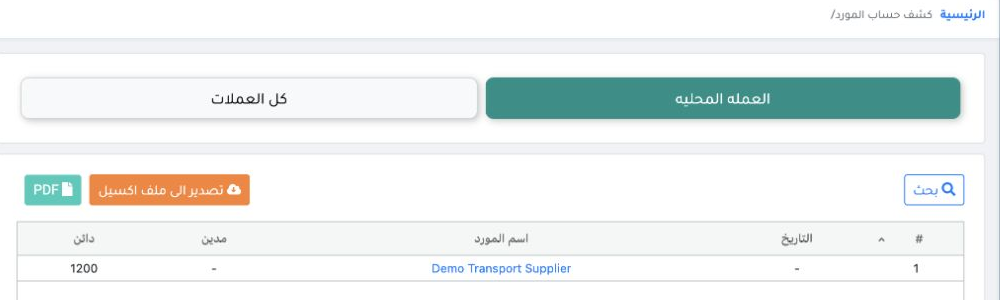
2 Read the Debit and Credit columns. In this example, the supplier has a net credit balance of EGP 1,200. To export, use Export to Excel or PD...
Read the Debit and Credit columns. In this example, the supplier has a net credit balance of EGP 1,200. To export, use Export to Excel or PDF. To review the transactions, select the supplier name.

Review the supplier transactions
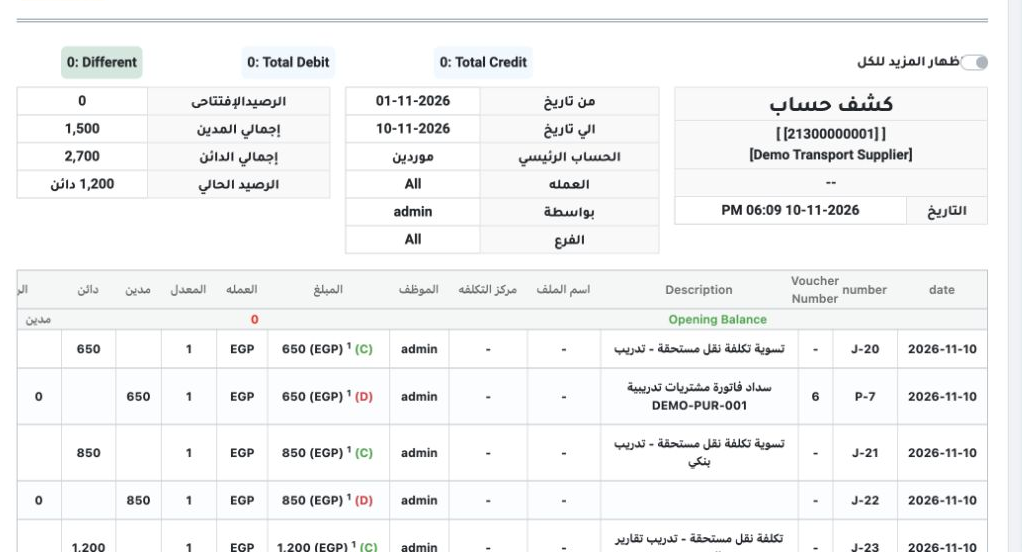
3 In the detailed ledger, J-23 records invoice DEMO-PUR-003 as an EGP 1,200 credit. The ledger shows total credits of EGP 2,700 and total debi...
In the detailed ledger, J-23 records invoice DEMO-PUR-003 as an EGP 1,200 credit. The ledger shows total credits of EGP 2,700 and total debits of EGP 1,500, leaving a credit balance of EGP 1,200. Compare that balance with the sum of the supplier’s aging buckets.

Sign in to record the lessons you have read. Sign in