Skip to content
Trio Travel guide

Incoming Cheque Workflow

On this page
  1. Record the cheque receipt
  2. Post the incoming cheque
  3. Verify posting and open the entry
  4. Review the debit and credit
  5. Deposit the cheque
  6. Record collection
  7. Verify collection
  8. Review the deposit entry
  9. Review the collection entry
  10. Prepare the returned cheque example
  11. Deposit the example cheque
  12. Record the bank return
  13. Verify the return status
  14. Review the return entry
  15. Open the customer return action
  16. Record the return to the customer
  17. Verify the customer return
  18. Review the customer return entry

Record and post the incoming cheque, then deposit it, record collection or return, and review the linked entries.

Record the cheque receipt
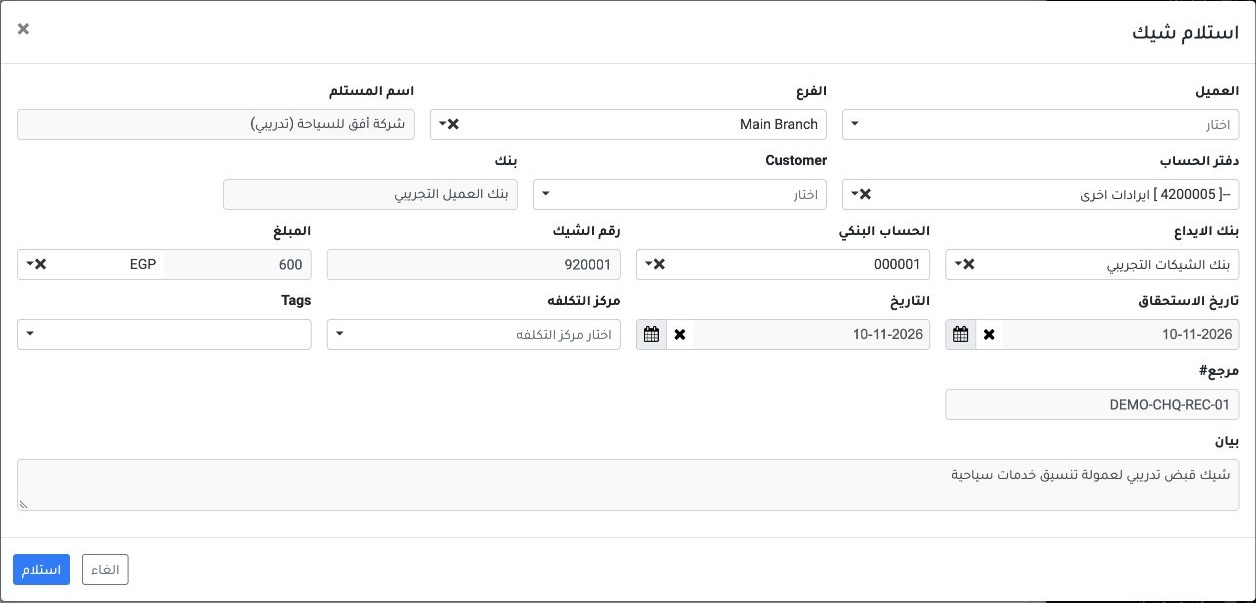
1 Open Banks → Cheques → Cheque Report and choose Receive Cheque. Set the branch and offset ledger, enter the party in the field labeled Recip...
Open Banks → Cheques → Cheque Report and choose Receive Cheque. Set the branch and offset ledger, enter the party in the field labeled Recipient, and enter the bank shown on the cheque in Bank. When specifying a deposit destination, select Deposit Bank and the bank account. Enter the cheque number, amount, currency, receipt and due dates, reference and description, then choose Receive. The example shows cheque 920001 for EGP 600 and account 000001.

Post the incoming cheque

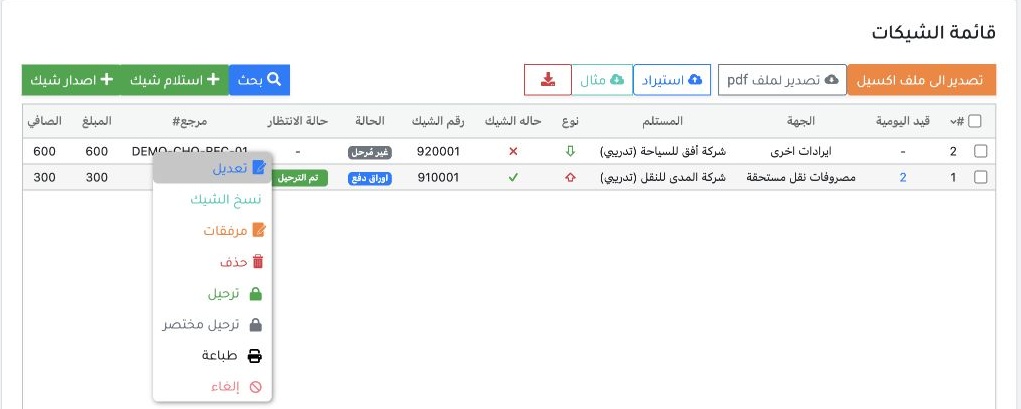
2 Locate cheque 920001 using reference DEMO-CHQ-REC-01. Right-click the row and choose Post to send the cheque to the posting queue.
Locate cheque 920001 using reference DEMO-CHQ-REC-01. Right-click the row and choose Post to send the cheque to the posting queue.

Verify posting and open the entry

3 Refresh the register, verify Posted, and open the Journal Entry link on the cheque row. The payment column in this example still showed Unpa...
Refresh the register, verify Posted, and open the Journal Entry link on the cheque row. The payment column in this example still showed Unpaid after receipt posting.

Review the debit and credit

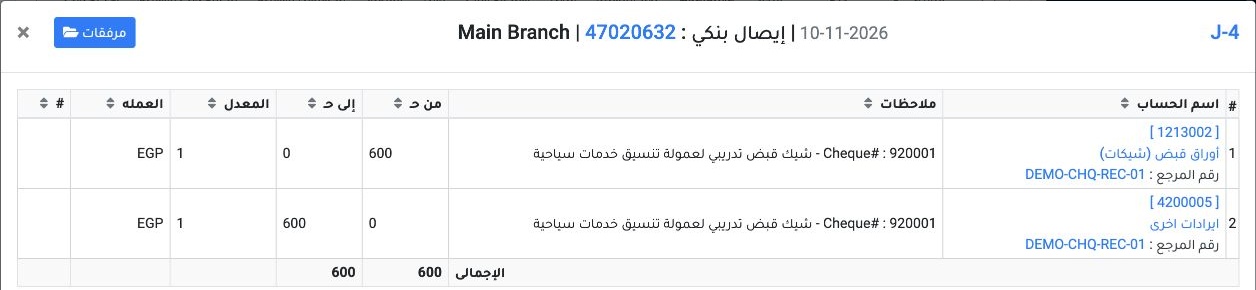
4 In Journal Entries, choose View from the J-4 row menu. Receipt posting debited Notes Receivable (Cheques) (1213002) and credited Other Reven...
In Journal Entries, choose View from the J-4 row menu. Receipt posting debited Notes Receivable (Cheques) (1213002) and credited Other Revenue (4200005) for EGP 600 each.

Deposit the cheque

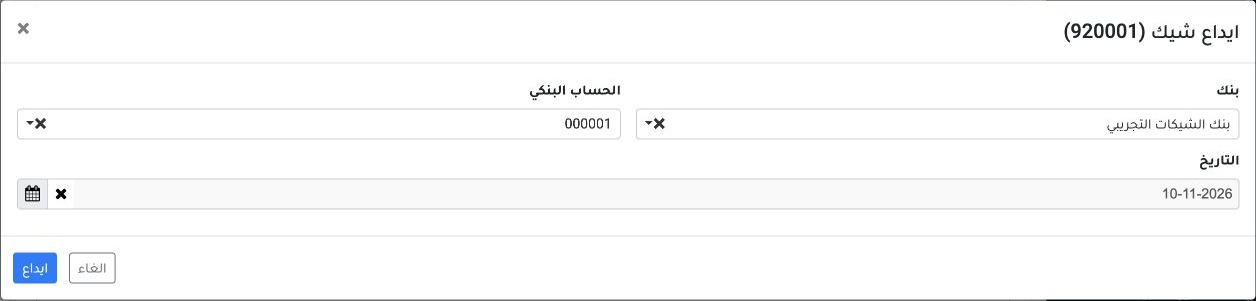
5 In Cheques, open the posted cheque’s row menu and choose Deposit in Bank. Select the bank, account and deposit date, then choose Deposit. Th...
In Cheques, open the posted cheque’s row menu and choose Deposit in Bank. Select the bank, account and deposit date, then choose Deposit. This example uses account 000001 for cheque 920001.

Record collection

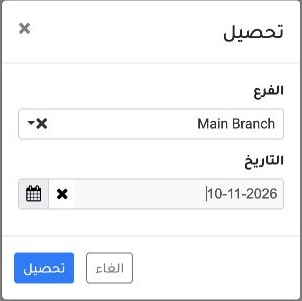
6 Once the cheque shows Deposited, open its row menu and choose Collect. Check the branch, enter the collection date, then choose Collect.
Once the cheque shows Deposited, open its row menu and choose Collect. Check the branch, enter the collection date, then choose Collect.

Verify collection

7 Refresh the register and check for bank_collected on the cheque row. Open its Journal Entry link to find the entries under reference 4702063...
Refresh the register and check for bank_collected on the cheque row. Open its Journal Entry link to find the entries under reference 47020632, then choose View from the relevant entry’s row menu.

Review the deposit entry

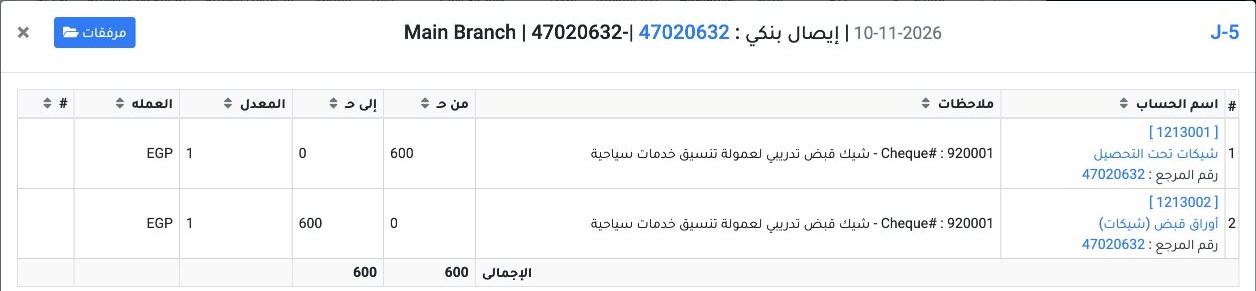
8 Deposit entry J-5 debited Cheques Under Collection (1213001) and credited Notes Receivable (Cheques) (1213002) for EGP 600 each.
Deposit entry J-5 debited Cheques Under Collection (1213001) and credited Notes Receivable (Cheques) (1213002) for EGP 600 each.

Review the collection entry

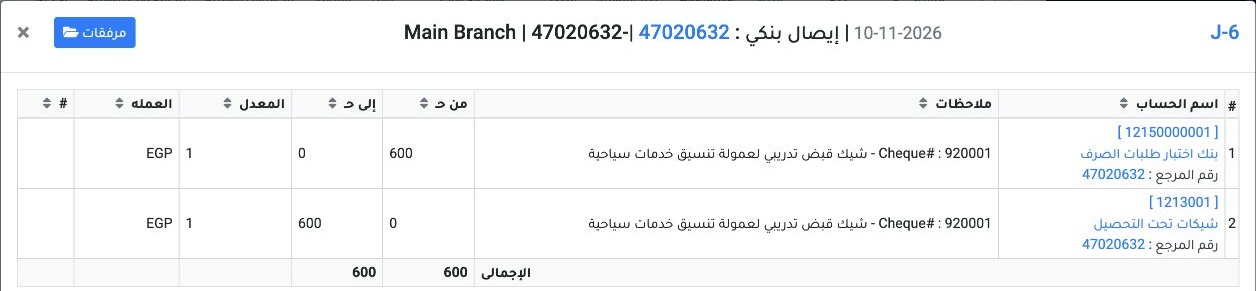
9 Collection entry J-6 debited the Payment Requests Test Bank (12150000001) and credited Cheques Under Collection (1213001) for EGP 600 each.
Collection entry J-6 debited the Payment Requests Test Bank (12150000001) and credited Cheques Under Collection (1213001) for EGP 600 each.

Prepare the returned cheque example

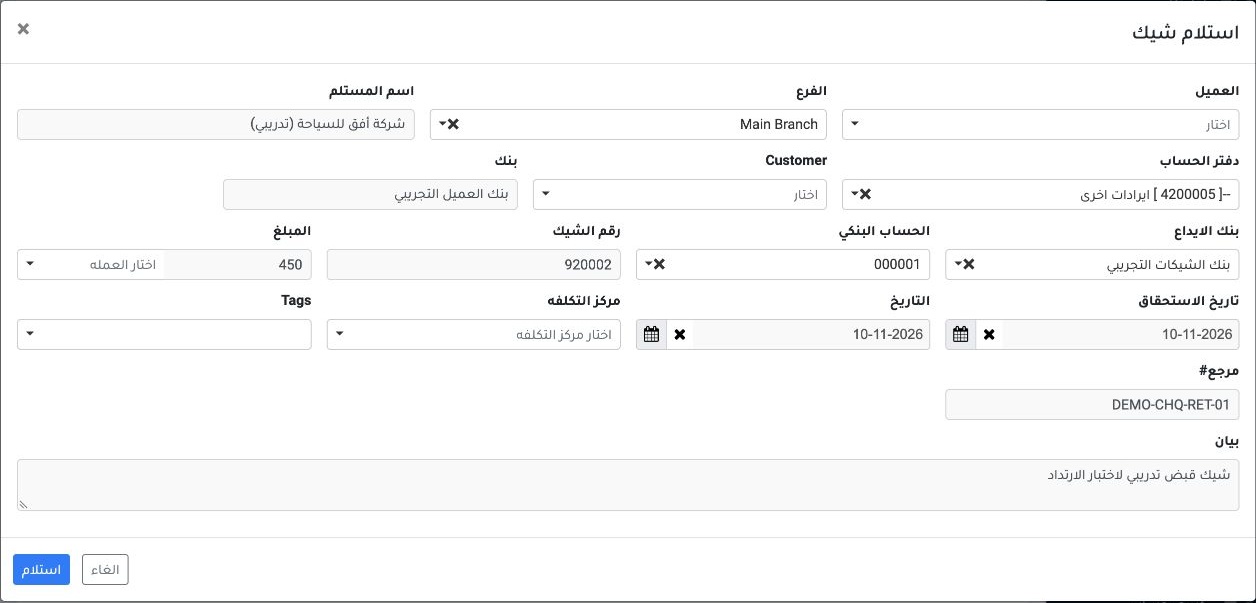
10 Receive the incoming cheque and post it from the row menu. This example uses cheque 920002 for EGP 450 and reference DEMO-CHQ-RET-01.
Receive the incoming cheque and post it from the row menu. This example uses cheque 920002 for EGP 450 and reference DEMO-CHQ-RET-01.

Deposit the example cheque

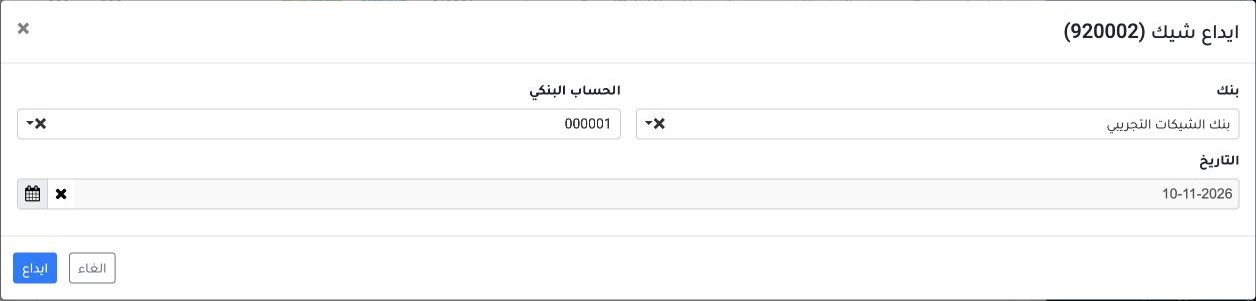
11 After posting, choose Deposit in Bank. Select the deposit bank and account 000001, enter the date and choose Deposit.
After posting, choose Deposit in Bank. Select the deposit bank and account 000001, enter the date and choose Deposit.

Record the bank return

12 From the deposited cheque’s row menu, choose Return from Bank. Enter the return date and reason, then choose Return.
From the deposited cheque’s row menu, choose Return from Bank. Enter the return date and reason, then choose Return.

Verify the return status

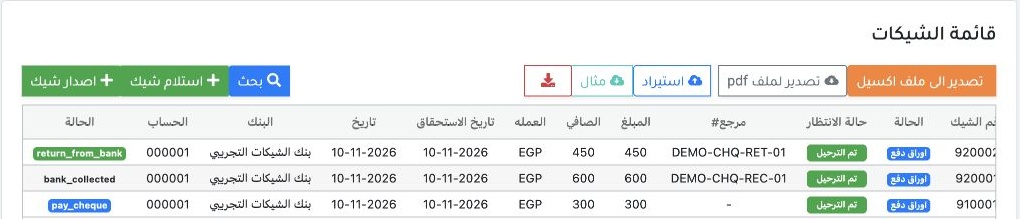
13 Verify that the cheque row shows return_from_bank. Open its Journal Entry link to find the receipt, deposit and return entries under referen...
Verify that the cheque row shows return_from_bank. Open its Journal Entry link to find the receipt, deposit and return entries under reference 47022971.

Review the return entry

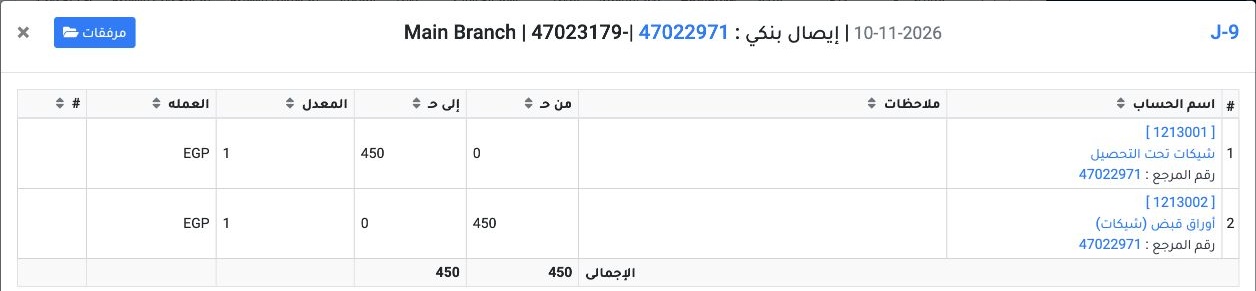
14 Choose View from the J-9 row menu. The return entry debited Notes Receivable (Cheques) (1213002) and credited Cheques Under Collection (1213...
Choose View from the J-9 row menu. The return entry debited Notes Receivable (Cheques) (1213002) and credited Cheques Under Collection (1213001) for EGP 450 each.

Open the customer return action

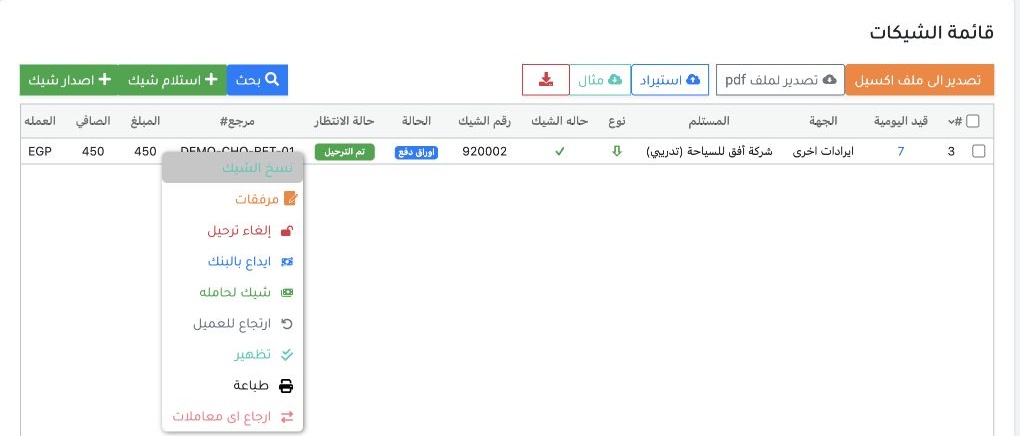
15 In the cheque register, locate cheque 920002 after it has been returned by the bank. Right-click its row and select Return to Customer.
In the cheque register, locate cheque 920002 after it has been returned by the bank. Right-click its row and select Return to Customer.

Record the return to the customer

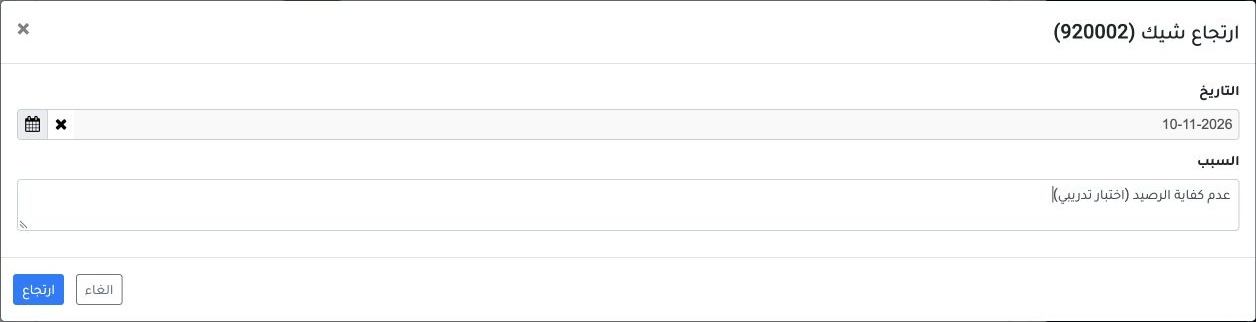
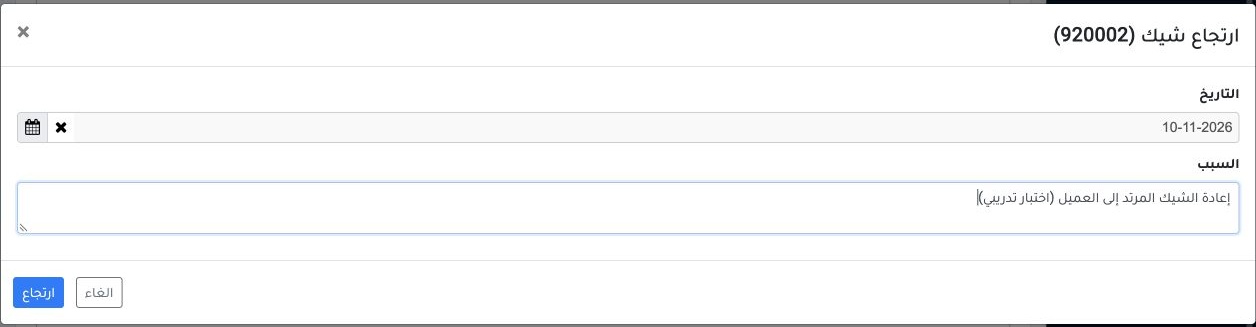
16 Check the cheque number in the dialog title, enter the return date and reason, then select Return. The return date in this example was 10 No...
Check the cheque number in the dialog title, enter the return date and reason, then select Return. The return date in this example was 10 November 2026.

Verify the customer return

17 After the success message, verify that the row shows return_to_customer. Open its Journal Entry link to review the entries under reference 4...
After the success message, verify that the row shows return_to_customer. Open its Journal Entry link to review the entries under reference 47022971.

Review the customer return entry

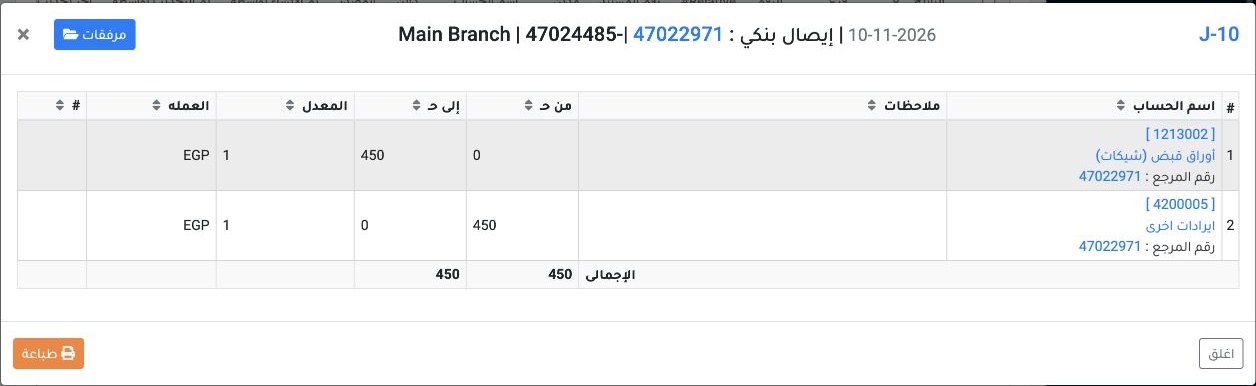
18 Choose View from the J-10 row menu. The system debited Other Revenue (4200005) and credited Notes Receivable (Cheques) (1213002) for EGP 450...
Choose View from the J-10 row menu. The system debited Other Revenue (4200005) and credited Notes Receivable (Cheques) (1213002) for EGP 450 each. This entry reversed the original receipt entry J-7 in this example.

Sign in to record the lessons you have read. Sign in