Skip to content
Trio Travel guide

Ledger Reports

On this page
  1. Review the entry lines
  2. Filter the ledger report
  3. Review totals and export

Review the entry lines

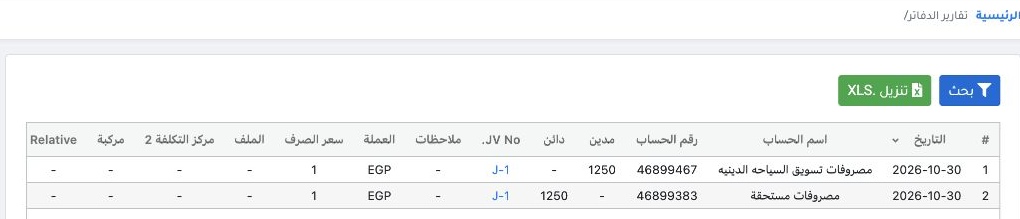
1 Open Accounting → Ledger Reports. The example shows both lines of J-1 dated 30 October 2026. Religious tourism marketing is debited and accr...
Open Accounting → Ledger Reports. The example shows both lines of J-1 dated 30 October 2026. Religious tourism marketing is debited and accrued expenses are credited. Select the entry number to open it in Journal Entries.

Filter the ledger report

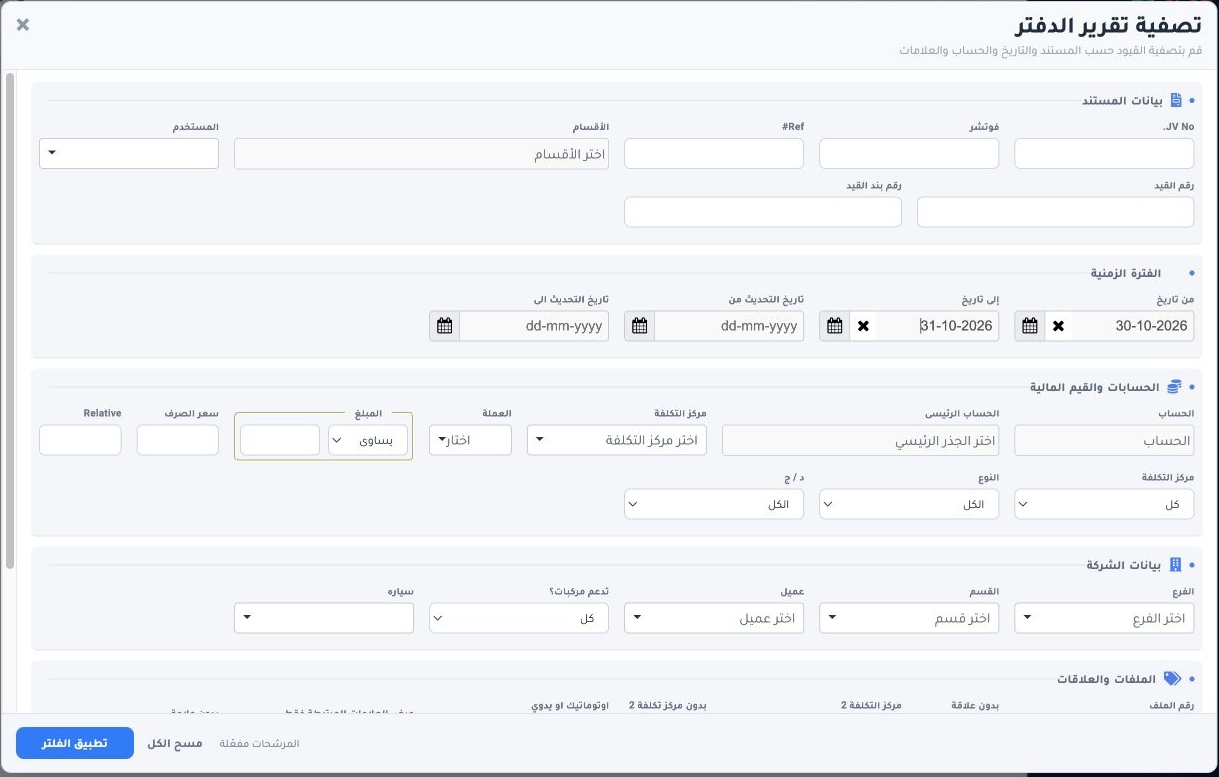
2 Select Search. Set the period, ledger or entry number. In Files and Relationships, use Tag2 when needed. The example uses 30–31 October and...
Select Search. Set the period, ledger or entry number. In Files and Relationships, use Tag2 when needed. The example uses 30–31 October and Apply Filter.

Review totals and export

3 Review the debit, credit and balance totals below the table. In the example, each side totals EGP 1,250 and the balance is zero. Use Downloa...
Review the debit, credit and balance totals below the table. In the example, each side totals EGP 1,250 and the balance is zero. Use Download XLS above the table to export results.

Sign in to record the lessons you have read. Sign in