Skip to content
Trio Travel guide

Cash Voucher Register

On this page
  1. Review the saved vouchers
  2. Search by confirmation status

Review the saved vouchers

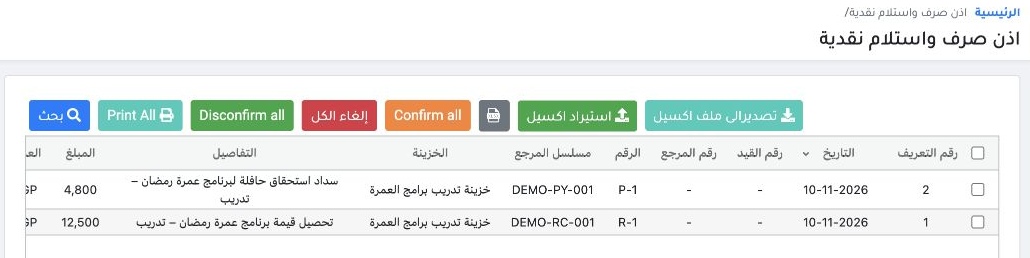
1 Open Cash Receipt and Payment above the voucher form, or the closing-accounts link under Treasury. The example shows R-1 for EGP 12,500 and...
Open Cash Receipt and Payment above the voucher form, or the closing-accounts link under Treasury. The example shows R-1 for EGP 12,500 and P-1 for EGP 4,800, both Unconfirmed. Use Excel export or print as needed.

Search by confirmation status

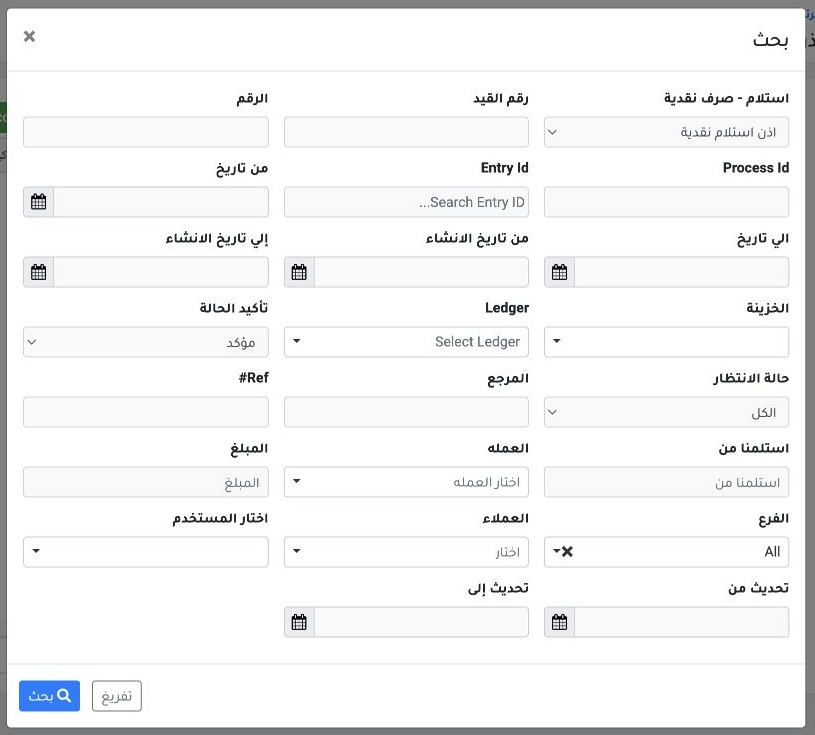
2 Open Search and set type, date or reference. The register defaults to Unconfirmed. Choose Confirmed to find confirmed vouchers. Posting a vo...
Open Search and set type, date or reference. The register defaults to Unconfirmed. Choose Confirmed to find confirmed vouchers. Posting a voucher creates a journal entry. Use cancellation as permitted by the voucher status to preserve the safe’s numbering.

Sign in to record the lessons you have read. Sign in