Skip to content
Trio Travel guide

Balance Sheet

On this page
  1. Set the balance sheet date
  2. Review assets and liabilities
  3. Read an account balance

Set the balance sheet date

1 In Financial Reports → Balance Sheet, select Search. Set the Through Date and account level, and choose a branch or Tag2 as needed. The exam...
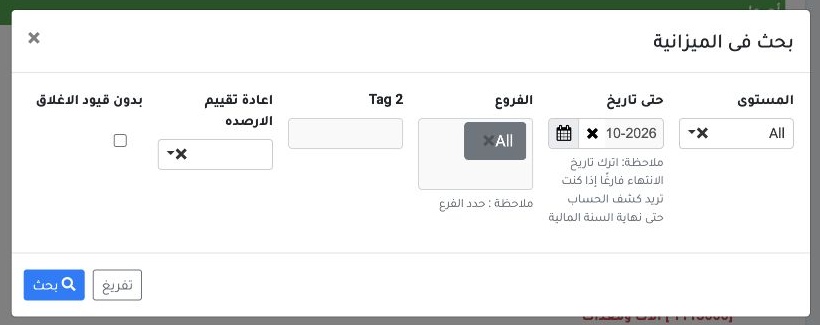
In Financial Reports → Balance Sheet, select Search. Set the Through Date and account level, and choose a branch or Tag2 as needed. The example uses 31 October 2026.

Review assets and liabilities

2 Review Assets, then Liabilities and Equity. The report shows individual balances and totals through the selected date.
Review Assets, then Liabilities and Equity. The report shows individual balances and totals through the selected date.

Read an account balance

3 In the example, Accrued Expenses shows a credit balance of EGP 1,250. Use XLS, PDF or Print at the top as needed.
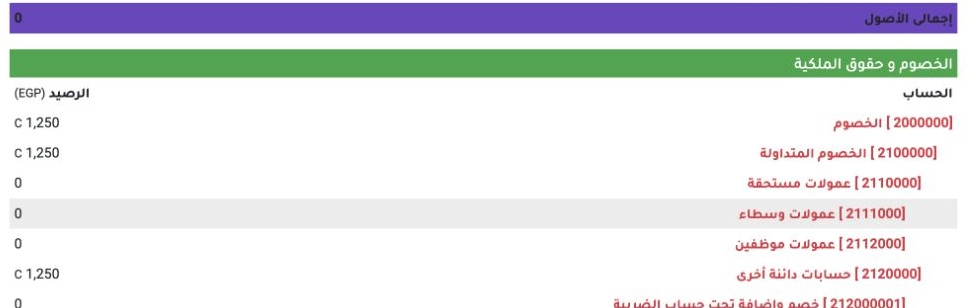
In the example, Accrued Expenses shows a credit balance of EGP 1,250. Use XLS, PDF or Print at the top as needed.

Sign in to record the lessons you have read. Sign in