Skip to content
Trio Travel guide

Purchase Invoices

On this page
  1. Enter the invoice and its lines
  2. Confirm posting
  3. Review the journal and register actions
  4. Create a cash payment from the invoice
  5. Confirm the voucher and check posting
  6. Verify the journal and outstanding balance
  7. Start a bank payment from a purchase invoice
  8. Enter the bank payment journal
  9. Verify the journal and the paid invoice

Enter the invoice and its lines
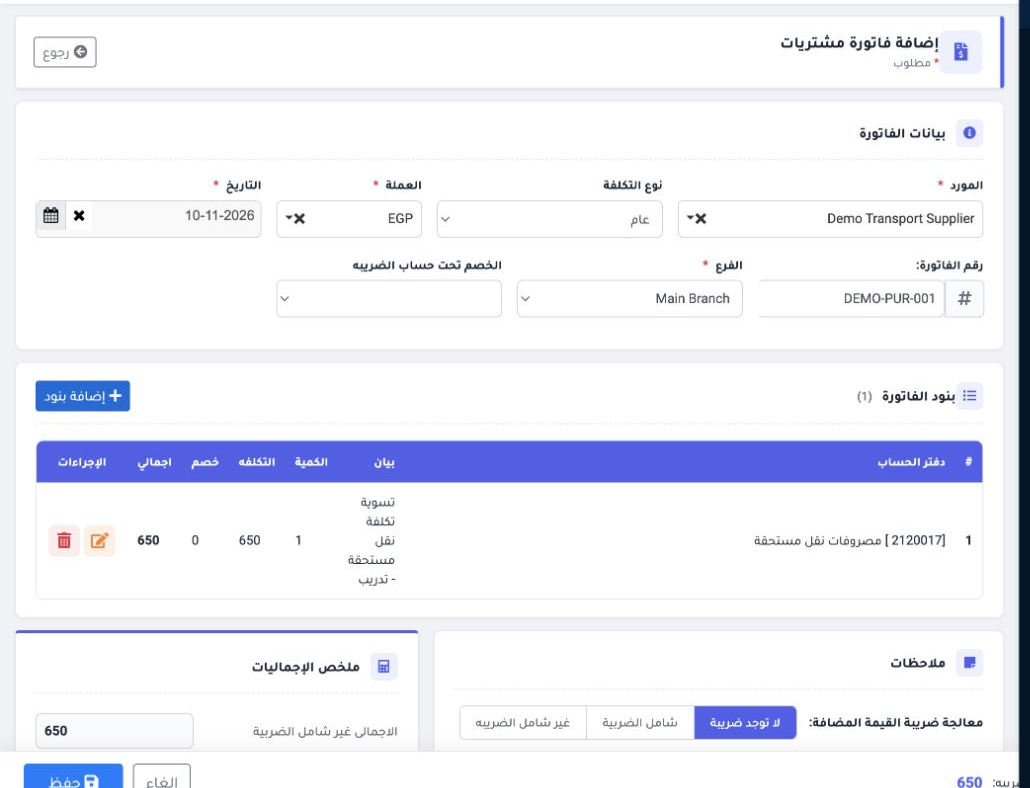
1 In Accounting → Purchase Invoices, select Add. Choose a supplier already set up in Portal → Suppliers. This example uses Demo Transport Supp...
In Accounting → Purchase Invoices, select Add. Choose a supplier already set up in Portal → Suppliers. This example uses Demo Transport Supplier, Main Branch, EGP, invoice number DEMO-PUR-001 and the General cost type.
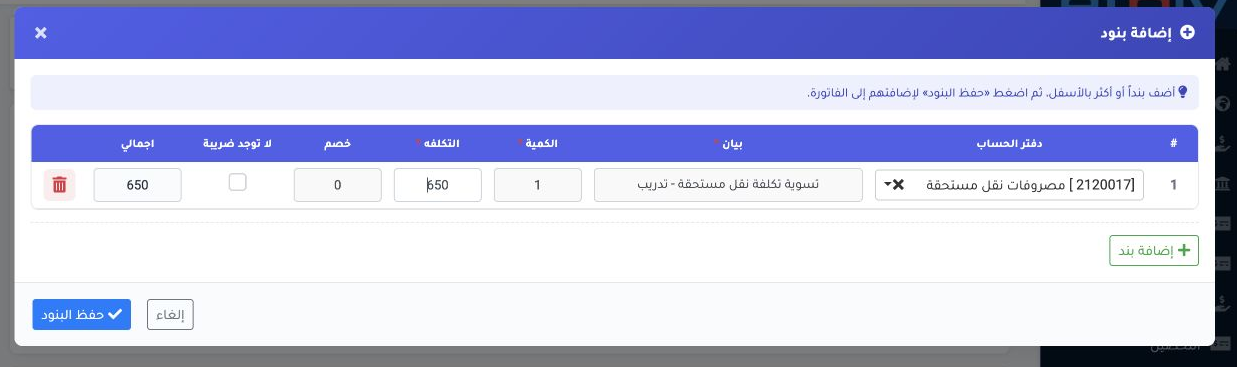
2 Choose Add Lines → Add Line. Find a ledger already defined in the chart of accounts. Ledger 2120017 was used to settle an accrued transport...
Choose Add Lines → Add Line. Find a ledger already defined in the chart of accounts. Ledger 2120017 was used to settle an accrued transport cost in this example. Enter the description, quantity 1 and cost EGP 650, then save the lines. Verify the EGP 650 total. The example uses No Tax. Save the invoice.

Confirm posting

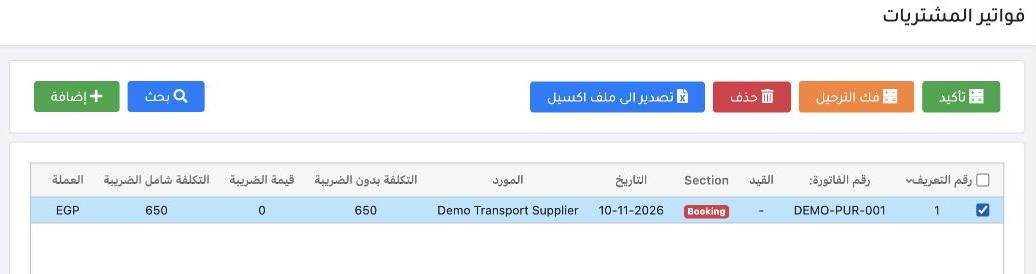
3 In the purchase invoice register, select only DEMO-PUR-001. Verify the supplier and total, then select Confirm.
In the purchase invoice register, select only DEMO-PUR-001. Verify the supplier and total, then select Confirm.
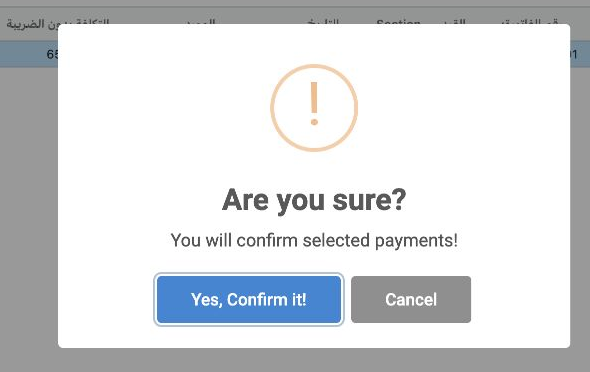
4 In the confirmation dialog, select Yes, Confirm it! to confirm the selected invoice.
In the confirmation dialog, select Yes, Confirm it! to confirm the selected invoice.
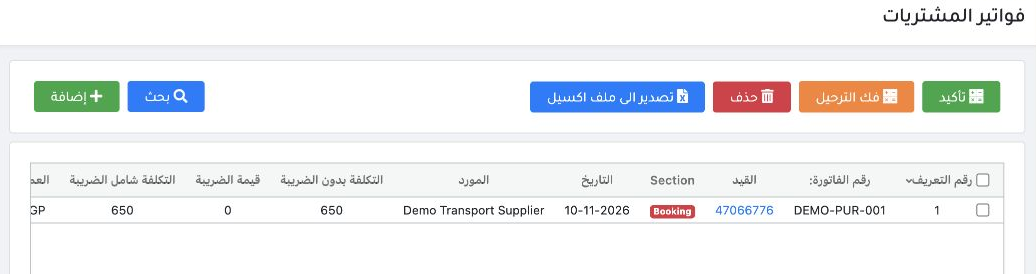
5 After posting completes, refresh the register if the status has not updated. In this example, the invoice showed Completed and its payment s...
After posting completes, refresh the register if the status has not updated. In this example, the invoice showed Completed and its payment status remained Unpaid, with EGP 650 outstanding.

Review the journal and register actions
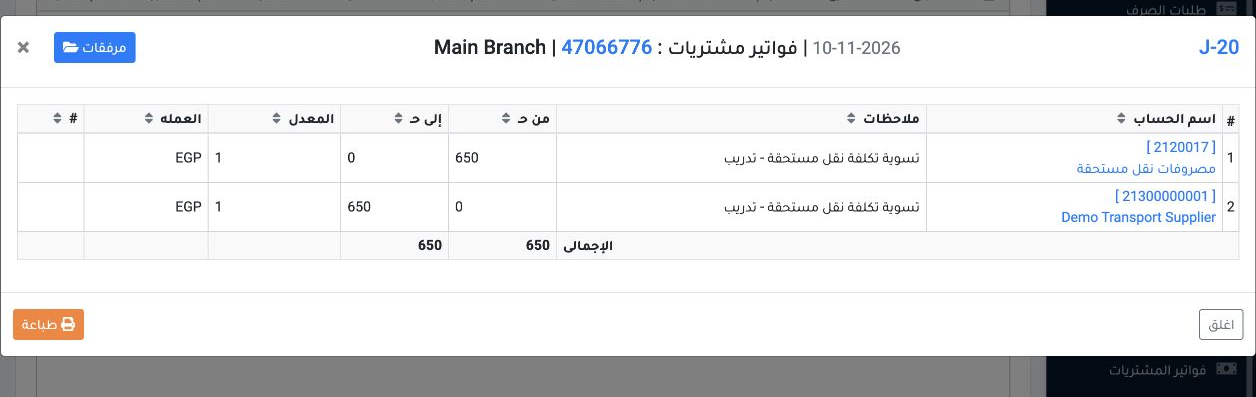
6 Open the journal link on the invoice row. J-20 shows EGP 650 debited to accrued transport costs ledger 2120017 and credited to Demo Transpor...
Open the journal link on the invoice row. J-20 shows EGP 650 debited to accrued transport costs ledger 2120017 and credited to Demo Transport Supplier ledger 21300000001.
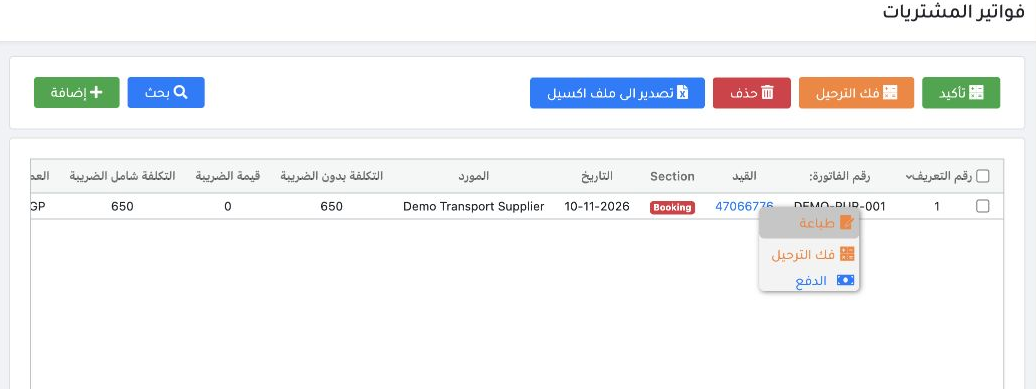
7 The posted row menu offers Print, Unpost and Payment. Use Search or Export to Excel from the register toolbar.
The posted row menu offers Print, Unpost and Payment. Use Search or Export to Excel from the register toolbar.

Create a cash payment from the invoice
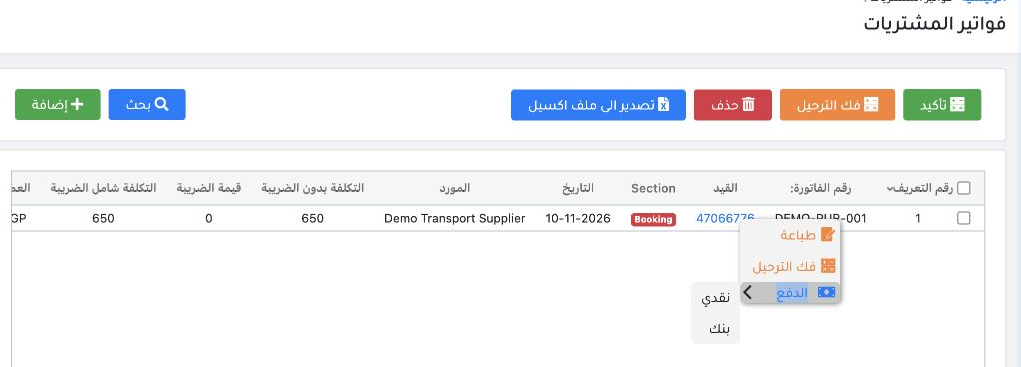
8 In Purchase Invoices, right-click invoice DEMO-PUR-001, open the Payment submenu and choose Cash.
In Purchase Invoices, right-click invoice DEMO-PUR-001, open the Payment submenu and choose Cash.
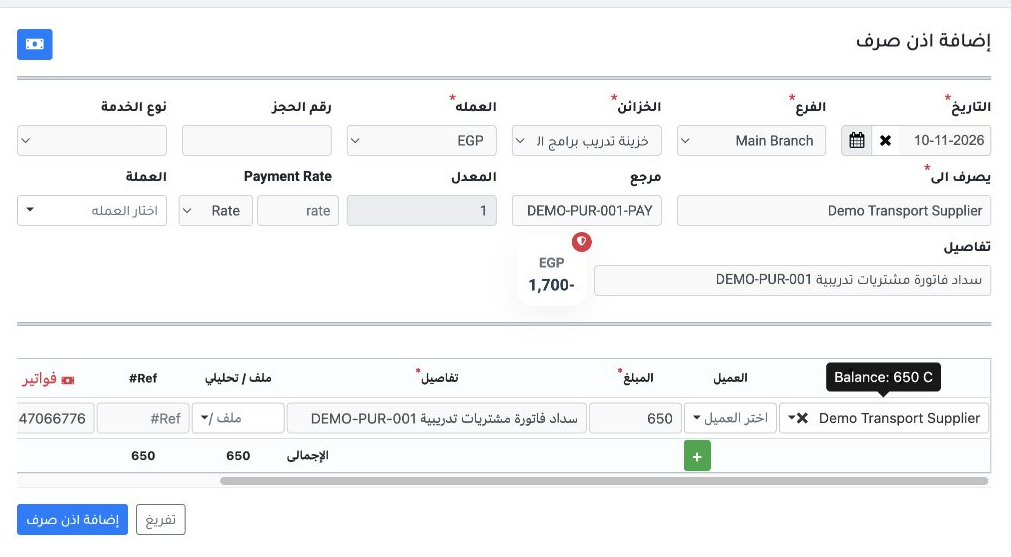
9 Choose Main Branch, wait for the list of safes to load, then choose the Umrah Programs Training Safe. Check that the currency is EGP and sel...
Choose Main Branch, wait for the list of safes to load, then choose the Umrah Programs Training Safe. Check that the currency is EGP and select Demo Transport Supplier under Ledger. Enter the payee and add details to the voucher and its line. Verify the prefilled amount of EGP 650 and invoice reference 47066776, then select Add Payment Voucher.

Confirm the voucher and check posting
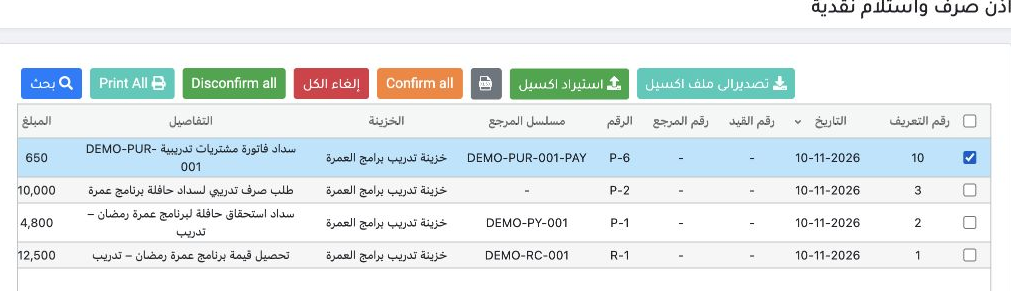
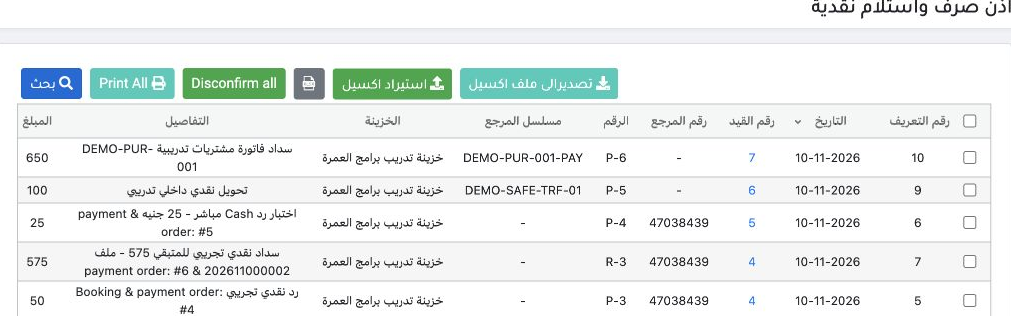
10 After saving, open Cash Receipts and Payments. Select only P-6. Match reference DEMO-PUR-001-PAY and the EGP 650 amount, then choose Confirm...
After saving, open Cash Receipts and Payments. Select only P-6. Match reference DEMO-PUR-001-PAY and the EGP 650 amount, then choose Confirm all and confirm the action.
11 After the voucher is queued, search with confirmation status Confirmed. Verify that P-6 shows Posted, then open link 7 in the Journal Number...
After the voucher is queued, search with confirmation status Confirmed. Verify that P-6 shows Posted, then open link 7 in the Journal Number column.

Verify the journal and outstanding balance
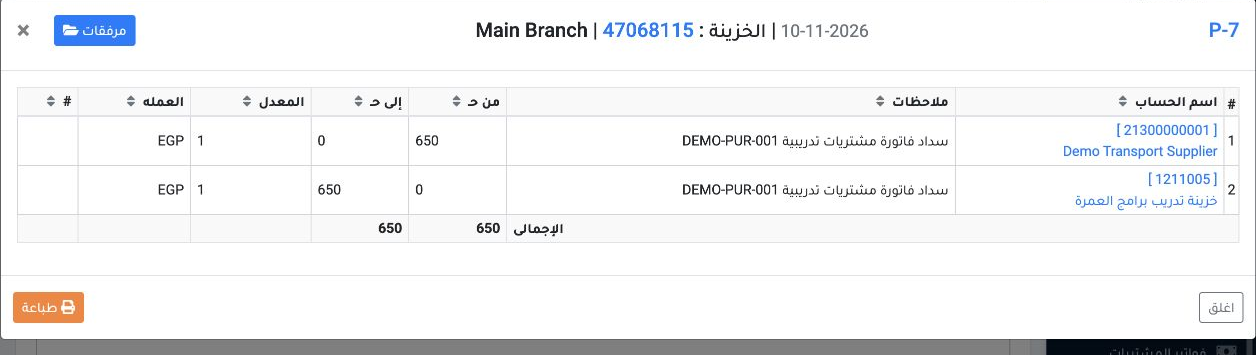
12 In the journal list, open View for entry P-7. The example shows a debit of EGP 650 to supplier ledger 21300000001 and a credit of EGP 650 to...
In the journal list, open View for entry P-7. The example shows a debit of EGP 650 to supplier ledger 21300000001 and a credit of EGP 650 to safe ledger 1211005.
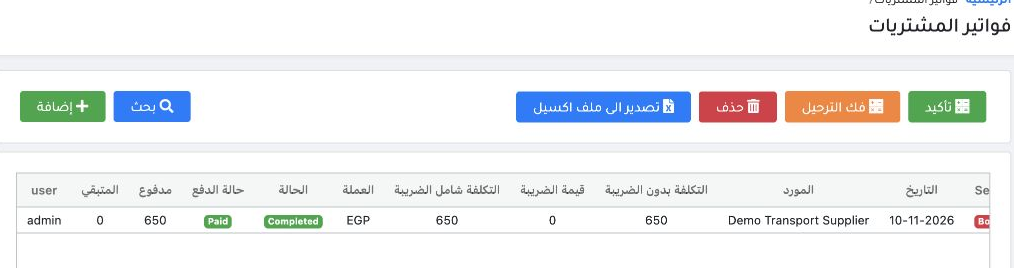
13 Return to Purchase Invoices and refresh the register. Verify that the payment status is Paid, the paid amount is EGP 650, and the remaining...
Return to Purchase Invoices and refresh the register. Verify that the payment status is Paid, the paid amount is EGP 650, and the remaining balance is zero.

Start a bank payment from a purchase invoice
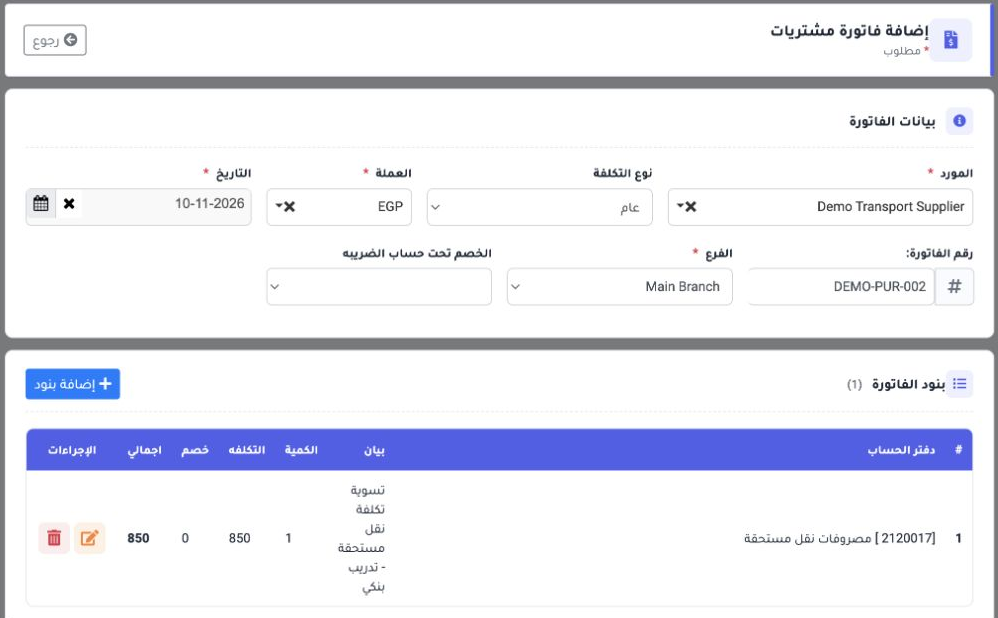
14 Create the purchase invoice and confirm its posting. Example: DEMO-PUR-002 for Demo Transport Supplier, Main Branch, EGP 850 without tax. Th...
Create the purchase invoice and confirm its posting. Example: DEMO-PUR-002 for Demo Transport Supplier, Main Branch, EGP 850 without tax. The invoice line used accrued transport cost account 2120017.
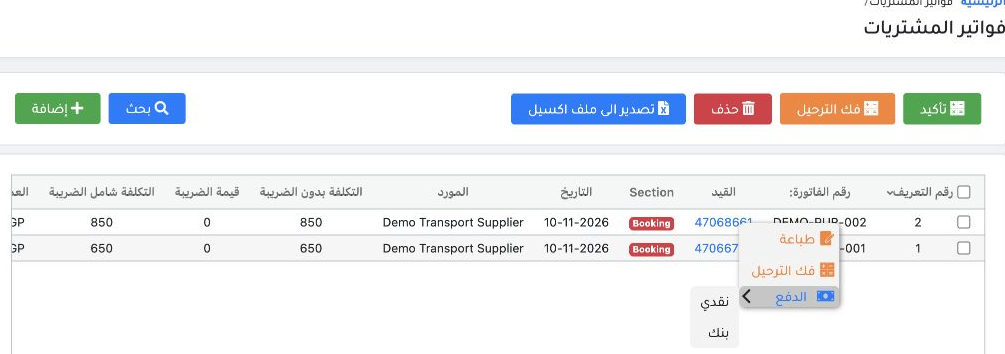
15 Once the invoice shows Completed, right-click its number, open Payment and choose Bank.
Once the invoice shows Completed, right-click its number, open Payment and choose Bank.

Enter the bank payment journal

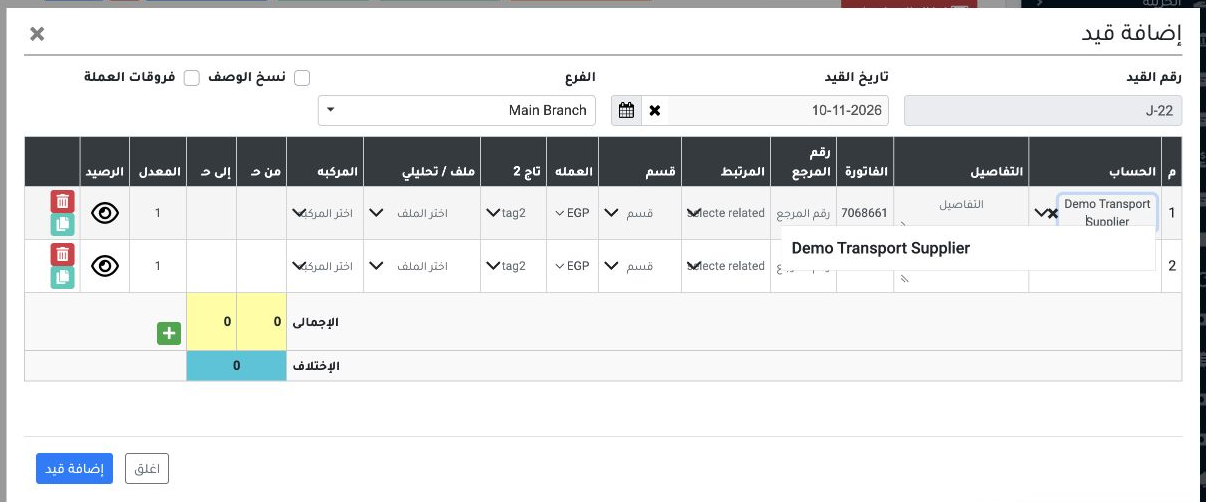
16 The option opens Add Entry in the journal register. Verify the supplier, branch, currency and invoice reference 47068661. Enter the amount y...
The option opens Add Entry in the journal register. Verify the supplier, branch, currency and invoice reference 47068661. Enter the amount yourself; the debit and credit fields start blank.
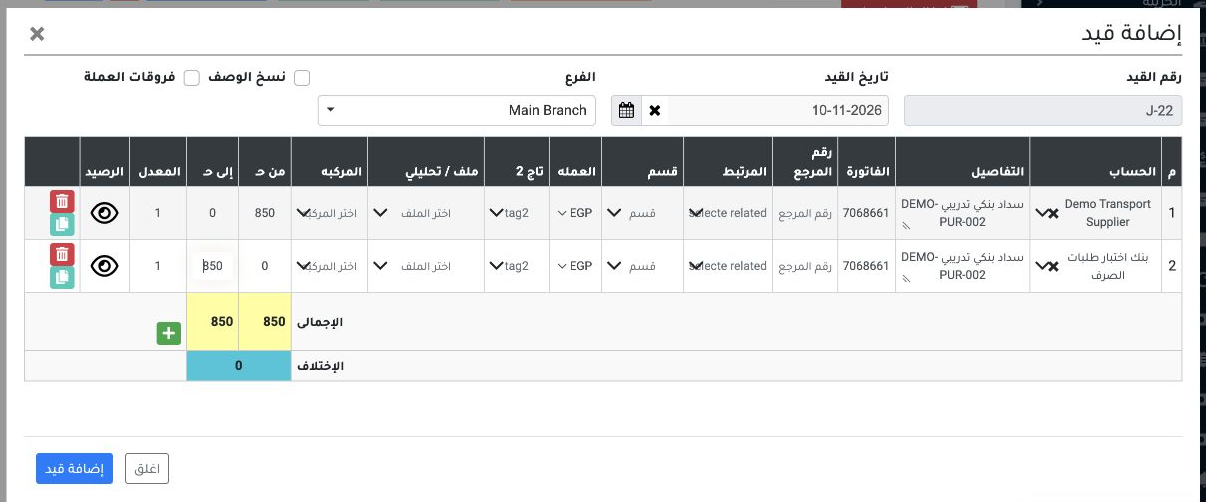
17 Enter EGP 850 in Debit on the supplier line. On the second line, select bank ledger 12150000001 and enter EGP 850 in Credit. The ledger is m...
Enter EGP 850 in Debit on the supplier line. On the second line, select bank ledger 12150000001 and enter EGP 850 in Credit. The ledger is marked as a bank account in the chart of accounts. Verify a zero difference, select Add Entry, and wait for the success message.

Verify the journal and the paid invoice
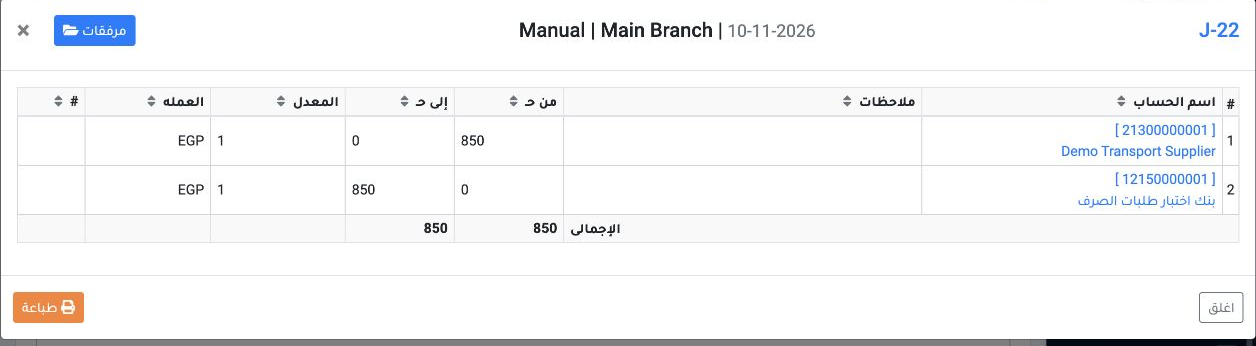
18 In the journal register, choose View for J-22. It debits the supplier ledger 21300000001 and credits bank ledger 12150000001, EGP 850 each....
In the journal register, choose View for J-22. It debits the supplier ledger 21300000001 and credits bank ledger 12150000001, EGP 850 each. The original purchase invoice was posted in J-21.
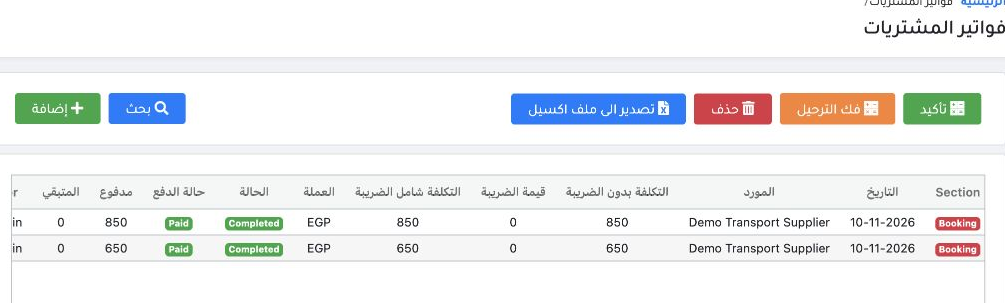
19 Return to Purchase Invoices and refresh the register. Verify Paid, EGP 850 paid and a zero remaining balance.
Return to Purchase Invoices and refresh the register. Verify Paid, EGP 850 paid and a zero remaining balance.

Sign in to record the lessons you have read. Sign in