Skip to content
Trio Travel guide

Analytical Accounts

On this page
  1. Add an analytical account
  2. Find an analytical account

Add an analytical account

1 Open Accounting → Settings → Analytical Accounts. Enter the account name, select the related ledger, and choose Add Cost. The Excel controls...
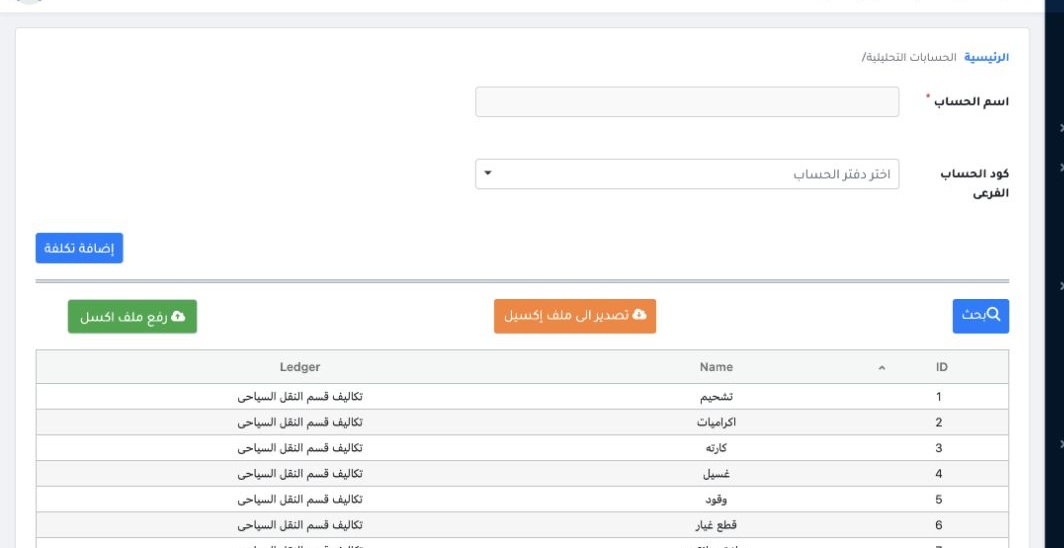
Open Accounting → Settings → Analytical Accounts. Enter the account name, select the related ledger, and choose Add Cost. The Excel controls provide export and import.

Find an analytical account

2 Select Search and set the account name, account code or subaccount code. Select Search to apply the criteria or Clear to reset them.
Select Search and set the account name, account code or subaccount code. Select Search to apply the criteria or Clear to reset them.

Sign in to record the lessons you have read. Sign in