Skip to content
Trio Travel guide

Monthly Salary Calculation Form

On this page
  1. 1 Set the calculation scope
  2. 2 Attendance inputs
  3. 3 Basic information
  4. 4 Insurance information
  5. 5 Entitlements
  6. 6 Additions and deductions

Inspect employee details and salary inputs across the calculation form sections.

1 Set the calculation scope
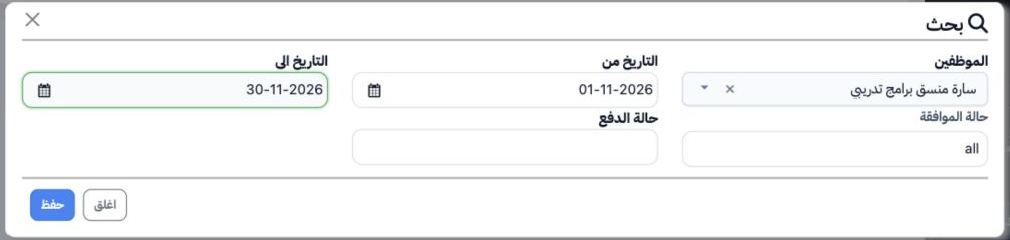
1 Open HR → Overview → Reports → Monthly Salary Calculation Form. Select Search, choose the employee and date range, and set approval and paym...
Open HR → Overview → Reports → Monthly Salary Calculation Form. Select Search, choose the employee and date range, and set approval and payment statuses if needed. Select Save to apply the search. The example uses Sarah for 1–30 November 2026.

2 Attendance inputs

2 Attendance displays the employee code and name, working days, absence, holidays, hours and amounts, allowances, incentives and deductions. S...
Attendance displays the employee code and name, working days, absence, holidays, hours and amounts, allowances, incentives and deductions. Scroll horizontally to inspect the remaining columns. Check and apply the required period in Search when moving between sections.

3 Basic information

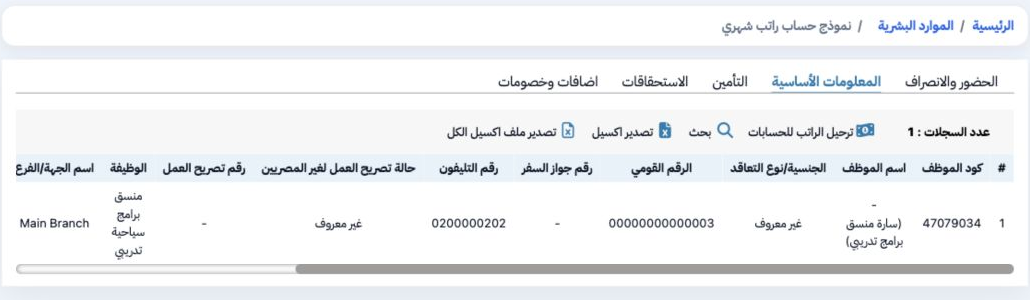
3 Open Basic Information to inspect nationality and contract type, identification, passport, telephone, work permit, job, branch, tax treatmen...
Open Basic Information to inspect nationality and contract type, identification, passport, telephone, work permit, job, branch, tax treatment and work duration. Update employee details in Employees. The example contains fictional identification and contact values.

4 Insurance information

4 Open Insurance to inspect status, number, enrolment, employment-end and subscription-end dates, gross and insured wages, allowances, dependa...
Open Insurance to inspect status, number, enrolment, employment-end and subscription-end dates, gross and insured wages, allowances, dependants and insurance premiums. Maintain these values on the employee record. Scroll horizontally to inspect the remaining fields.

5 Entitlements

5 Open Entitlements to inspect basic pay and the displayed entitlement components. Sarah’s row shows a 10,000 basic salary. Use horizontal scr...
Open Entitlements to inspect basic pay and the displayed entitlement components. Sarah’s row shows a 10,000 basic salary. Use horizontal scrolling to inspect columns outside the visible area.

6 Additions and deductions

6 Open Additions and Deductions to inspect end-of-service benefits, leave balance amounts, advances and loans, instalments, alimony, union sub...
Open Additions and Deductions to inspect end-of-service benefits, leave balance amounts, advances and loans, instalments, alimony, union subscriptions, life-insurance premiums and other components. Use Export Excel to request the current export, or Export All Excel for the broader export action.

Sign in to record the lessons you have read. Sign in