Skip to content
Trio Travel guide

Leave Report

On this page
  1. 1 Set the search filters
  2. 2 Read the balance and request an export

Filter by employee and leave type, then inspect displayed entitlement, leave taken and balance.

1 Set the search filters
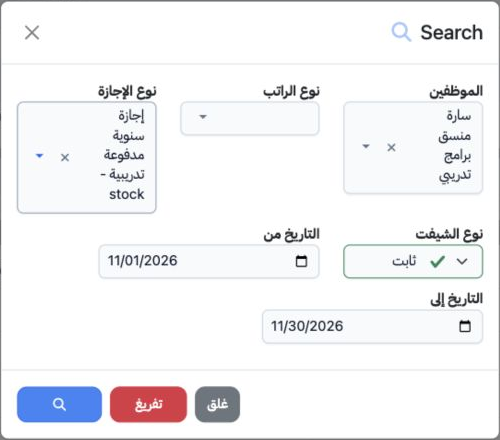
1 Open HR → Overview → Reports → Leave Report. Select Search and choose the employee and leave type from the selector results. Salary Type and...
Open HR → Overview → Reports → Leave Report. Select Search and choose the employee and leave type from the selector results. Salary Type and Shift Type can narrow the scope. Set From and To dates, then use the magnifying-glass button inside the dialog. Clear resets filters. The example uses Sarah, the training annual leave type and 1–30 November 2026. Define leave types in HR Settings and assign them on the employee record.

2 Read the balance and request an export
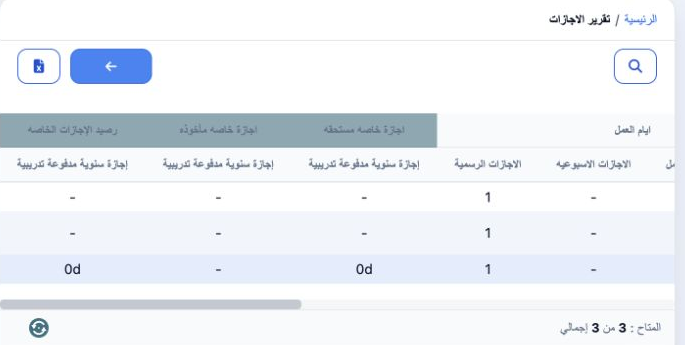
2 Review department, job, employee name and code, and employment start date. The next group shows period days, working days and holidays. Each...
Review department, job, employee name and code, and employment start date. The next group shows period days, working days and holidays. Each leave type appears under Entitled Special Leave, Special Leave Taken and Special Leave Balance. Scroll horizontally to inspect these groups. This example displays 0d for entitlement and balance and a dash for leave taken. Select the employee-name link to open the record, or Download Excel to request an export.

Sign in to record the lessons you have read. Sign in